

Web Hosting Speed Really Matters Today

In today’s era, where we expect nearly everything to be a fast click away, the speed of your website can have a significant impact on the experience you provide. Whether you run a personal blog, business website, creative project, or online store, unnecessary delays can separate visitors who stay and explore from those who simply move on.
Web hosting speed does indeed matter because the server provides the foundation from which your website serves its pages, files, images, databases, and other resources. It cannot correct every performance problem inside a website, but a capable foundation gives a well-built site a better place from which to operate.
We’ll explore why speed matters, what influences website performance, where the server fits into the equation, and how different services can meet different website requirements.
1. Why Speed Is Central to the Modern User Experience

When someone opens a web page, there is usually a simple expectation: something useful should begin appearing without an unnecessary wait. Every visitor arrives with a different device, connection, location, and level of patience, but excessive delays introduce friction before your content has even had an opportunity to speak for itself.
Website performance is therefore about more than chasing a particular number on a speed test. It is about removing unnecessary obstacles between the visitor and the information, photographs, products, services, or ideas they came to see.
A responsive website can also contribute to a stronger first impression. Good writing and attractive images still matter, but visitors need to reach them comfortably. Server performance, website design, image optimization, caching, scripts, plugins, databases, and the visitor’s own connection all contribute to the final experience.
2. Good Performance Comes From Several Parts Working Together
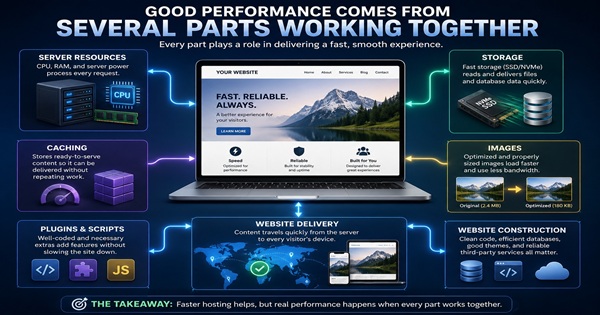
It is tempting to attribute website speed to one component. In reality, several pieces work together to deliver a page.
- Server resources: Incoming requests require processing power and memory to perform the work needed to serve the website.
- Storage: Website files and database information need to be read and delivered efficiently.
- Caching: Frequently requested content can often be served without unnecessarily repeating the same processing work.
- Images: Oversized or poorly optimized images can slow an otherwise capable website.
- Plugins and scripts: Additional functions can add processing work and browser requests.
- Website construction: Themes, code, databases and third-party services all contribute to the final result.
The lesson is straightforward: better server resources can help, but moving a badly overloaded website to a more powerful plan does not automatically eliminate bottlenecks hiding inside the site itself.

Starting a website doesn’t need to be complicated. Shared Hosting can be the starting point for creating a uniquely new website, a place to unharness a personal project, bring a creative blog to life, unleash your portfolio, or give your small business a voice. It provides a practical place and platform to begin, while your hosting provider quietly takes care of the shared server environment in the background.
As your ideas begin taking shape, you can put your attention where it belongs, into your own website. Open up your freedom to build upon your creativity, add new content as you wish, reach out to new visitors, and discover what your ideas and website combined can become, without having to take on the brunt of the technical responsibilities or manage them all yourself.
As your website begins to grow, Shared Hosting can continue growing right alongside you and your creative ideas. Give your content room to develop, welcome new visitors, and watch what began as an idea become increasingly renowned and established on the web. This is your opportunity to create, explore, and discover where your ideas can take you, beginning with a practical home for your website and a place of your own on the web.

4. Managed WordPress Takes a More Specialized Approach
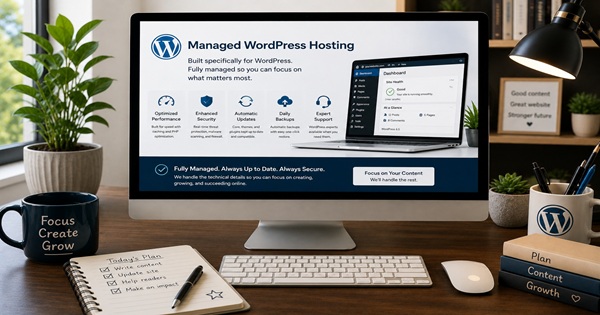
WordPress has its own ecosystem of themes, plugins, updates, databases and caching requirements. A service designed specifically around WordPress can therefore approach the job differently from a general-purpose account.
Managed WordPress Hosting is intended for people who want to run WordPress while allowing more of the underlying environment to be managed for them.
That does not make it a magical speed switch, nor can it make poorly constructed pages disappear. Its advantage is specialization: WordPress and the server environment can be managed with the same platform in mind.
5. Website Speed Matters Without Becoming a Numbers Game

Performance measurements are useful because they can reveal problems, but a website should not be built merely to chase a perfect score. A measurement becomes valuable when it helps explain what a real visitor is experiencing.
Core Web Vitals Measure Different Parts of the Experience
| Core Web Vital | What It Measures | Why It Matters |
|---|---|---|
| Largest Contentful Paint (LCP) | Loading performance | Helps show how quickly important visible content becomes available. |
| Interaction to Next Paint (INP) | Responsiveness | Helps measure how promptly a page responds when someone interacts with it. |
| Cumulative Layout Shift (CLS) | Visual stability | Helps identify unexpected movement of page elements while the page is being viewed. |
The server can influence part of this experience, particularly how quickly it begins responding and producing content. Images, scripts, plugins, caching and page construction determine much of what happens afterward.
6. When a VPS Becomes the More Appropriate Step
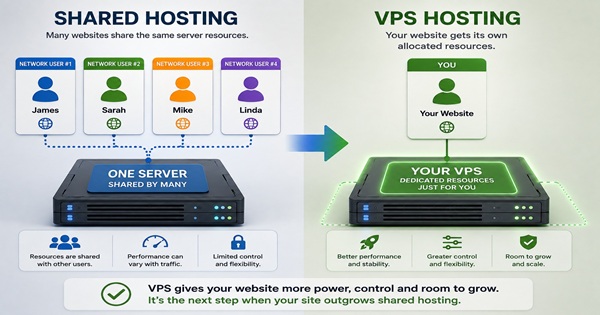
As a website or application grows, shared hosting can eventually become restrictive because server resources are divided and shared among multiple website owners.
A VPS (Virtual Private Server) provides a more private hosting environment, with resources allocated to your own virtual server.
This gives a growing website more room and greater control over its hosting environment, helping it handle efficiently increased workloads and the ever-growing demands of website traffic.
Unmanaged VPS vs Managed VPS Hosting

To be or not to be—the choice comes down to technical skill, creative freedom, or perhaps a little of both. Whatever level you’re at right now, you may want the hands-on FULL control of an Unmanaged VPS, using your own skills and fine-tuning like a server guru. Or select Managed VPS if you’d rather leave the technical fine-tuning to the provider and concentrate mainly on being creative. Either way, you can shine like a pro—just choose the one that best fits YOU!


Managed VPS
A Managed VPS can be a practical choice for someone who wants the additional resources and flexibility of a VPS without having to deal with as much of the underlying server structure and ongoing maintenance themselves.
Much of that responsibility remains with the hosting provider, leaving the website owner more time to concentrate on the website, its content, customers, development, and everyday operation.
With a Managed VPS, you can shine like a pro without having to become a master server guru yourself.
Unmanaged VPS
An Unmanaged VPS takes almost the opposite approach.
It can be an excellent choice for seasoned professionals, developers, and technically experienced users who understand the internal workings of a server environment through and through and want greater control over how its elements and functions are configured and maintained.
Unmanaged VPS can be less costly, but the lower cost comes with considerably more responsibility.
If technical problems arise, the customer may be largely responsible for troubleshooting, finding the cause, correcting the problem, setup, configuration, security, updates and maintenance.
That responsibility is not automatically a disadvantage. For an experienced developer who wants hands-on control, that freedom can be an advantage.
Neither choice is automatically better. Managed VPS reduces the amount of server administration placed on the website owner, while Unmanaged VPS provides greater hands-on control to someone prepared to manage it.
The correct choice depends on both the resources your website requires and the amount of technical work you want to handle yourself.


7. Good Support Matters When Something Goes Wrong

Performance is easy to appreciate when everything is working. Support becomes far more important when something unexpectedly stops behaving the way it should.
A support team can investigate an issue and attempt to identify its source. Depending on what they discover, they may correct a server-side problem, show the customer where to look, guide them through an adjustment, or help identify another component requiring attention.
Good support does not mean promising that a provider can repair everything connected to a website. It means providing help to the degree that they can, within their limits of controlled responsibility.
From our own experience, Hosting.com has provided reassuring customer support when we’ve needed assistance. That is our experience rather than a promise that every customer or technical situation will be identical.
8. Security and Performance Need to Work Together

Security and performance should not be treated as opposing goals. A website needs both. SSL, sensible access controls, updates, monitoring and other protective measures help maintain a healthier environment, while efficient storage, caching and responsible resource use help the site perform its everyday work.
A compromised or badly maintained website can consume resources for all the wrong reasons. Keeping software updated, removing unnecessary components and paying attention to unusual activity can therefore contribute to both security and dependable operation.
9. Mobile Visitors Make Efficiency Even More Important

A website owner cannot control the connection, device or location every visitor uses. One person may arrive through a fast wired connection while another reaches the same page through a weaker mobile signal.
Efficient images, restrained scripts, sensible caching and a responsive server reduce the amount of avoidable work standing between the visitor and the page. The objective is not to promise instantaneous loading everywhere; it is to avoid making people wait for work the website never needed to perform in the first place.
10. Ongoing Optimization Keeps a Good Website Healthy

Performance is not necessarily something you address once and forget. Content grows. Images accumulate. Plugins change. Themes receive updates. New services are connected, and something that was lightweight a year ago may become considerably more complicated over time.
Tools such as Google PageSpeed Insights can help identify areas worth investigating, but measurements are best treated as diagnostic information rather than a reason to make endless changes to a website that is already working properly.
Sometimes the most effective improvement is surprisingly simple: remove what is unnecessary, replace what no longer works well, and refine what remains.
11. Choose What Fits the Website

There is little value in paying for resources or administrative complexity a website does not require. At the same time, remaining with a service that a growing project has clearly outgrown can create unnecessary limitations.
The sensible approach is to understand what your website is doing today, consider where it may realistically be heading, and choose enough room for it to perform its job comfortably.
The important word is appropriate. The service should fit the website rather than forcing the website to fit the marketing description of a plan.
Matching the Service to the Job
| Service | Where It Can Fit | Management Approach |
|---|---|---|
| Shared Hosting | A comfortable starting place for blogs, portfolios, personal sites and many smaller business websites that don’t yet need their own server environment. | The provider manages the shared server environment, allowing you to spend more of your time building and running your website. |
| Managed WordPress Hosting | A natural fit for websites built around WordPress when you want an environment specifically designed with WordPress in mind. | Much of the technical environment is managed for you, giving you more time to concentrate on your WordPress website and its content. |
| Managed VPS | A practical step when a growing website or application needs more resources and room to comfortably handle increasing workloads and traffic. | The provider handles much of the underlying server administration and maintenance. You can concentrate on the creative side without having to become a master server guru yourself. |
| Unmanaged VPS | Well suited to seasoned developers and technically experienced users who understand the internal workings of a server environment and want greater control. | You take responsibility for much of the setup, security, updates, maintenance and troubleshooting. It can cost less, but when technical problems arise, much more of the solution rests with you. |
Final Thoughts: Web Hosting Speed Really Does Matter
Website speed matters because every page has a job to do. It may present an idea, display a photograph, explain a service, share years of knowledge, introduce a business, or simply give someone a place on the web that belongs to them.
The server provides the foundation. Good construction, efficient images, appropriate caching, sensible security and ongoing maintenance build upon it. None operates entirely alone.
There is also no single solution that automatically makes sense for everyone. Someone establishing a first website has different requirements from a developer administering a server or a business operating a demanding application.
If you would like to explore the choices for yourself, Hosting.com provides several environments to compare. Look at what each provides, consider what your own website actually requires, and decide whether one fits what you want to create.
Interesting Read
If you’re interested in exploring a little further, here’s a article post from Displays.org that may catch your interest.
Real Risks of Identity Theft and How to Protect Yourself
Take a closer look at identity theft, the risks that can follow us online, and practical ways to better protect personal information.
Explore Identity Theft Protection →
Some Hosting.com links on Displays.org are affiliate links. If you choose to make a purchase through one of them, we may receive a commission at no additional cost to you.